
 Kvs satish
Home Assistant 2025.5! 🎉
It’s time for the May release, and we have a lot to talk about! But before
we do, I want to quickly touch on things that happened in the last month that
you might have missed…
We recently hosted our State of the Open Home event—a live streamed show
where we discussed the current state and future vision of the Open Home Foundation
and its projects, including Home Assistant. During this event, we not only
revealed our roadmap for the upcoming year but also celebrated a tremendous
milestone:
2,000,000 active installations of Home Assistant worldwide! 🎉
Read more about the State of the Open Home in this summarized blog post
A community of 2 million households is something to celebrate! And we are
doing that by gathering together in person on Home Assistant Community Day
on May 24th 2025; over fifty! meetups are being organized all around the
world! Want to learn more? Join a meetup? Or even host one?
Check out the Home Assistant Community Day 2025 blog post for more information!
Ok, the May release, really, I love this one! It is filled to the brim with
quality of life improvements that I’m sure you will love. 🥰
The quest for a great backup system is continuing this release, shipping
quite the list of improvements, most notably the ability to set a retention
policy per backup location! Nabu Casa
whole bunch of new text-to-speech voice variants 🗣️ included in your Home Assistant Cloud subscription
allowing your announcements to sound, for example, sad or happy!
But… there is more! Z-Wave gets Long Range support 📶, you can now copy and
paste YAML automation snippets directly in our automation UI, a new tool to monitor the device discovery process in Home Assistant, and–my personal
favorite–the improved experience when you pick an entity anywhere in the UI. 🤩
Enjoy the release!
../Frenck
Another iteration of the backup system
In our January release,
we did the first overhaul of the backup system. In the February release,
we did an iteration based on your feedback. In this release, we dedicated even more
time to iterate and improve backups even further.
Let’s dive in!
Per location backup retention policy settings
This release adds a much-requested feature: the ability to set a backup retention
policy per location. This is particularly useful if you have multiple backup
locations configured in Home Assistant.
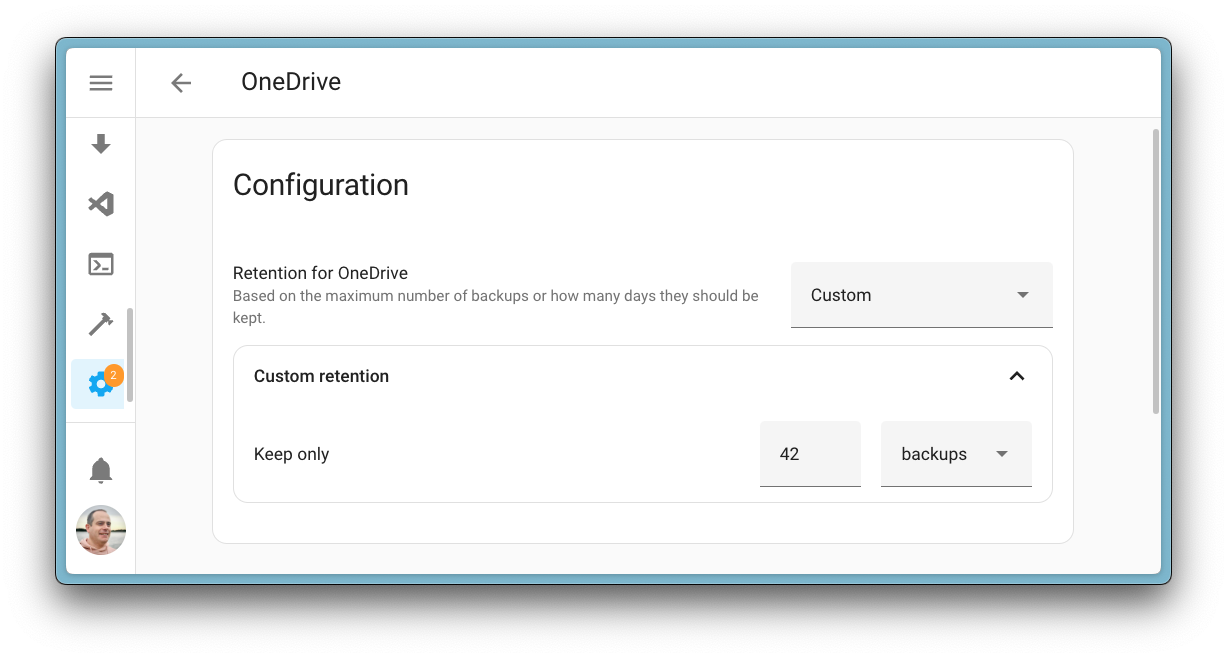
It might be that one of your backup locations has more storage space than
another, or that you want to keep more backups in one location than another.
For example, maybe you have space to store the last 3 backups in your Google
Drive, but you want to keep 25 backups on your local NAS server.
Backup before upgrading the Home Assistant Operating System
Updating the Home Assistant Operating System is as easy as clicking a button. And while the upgrade process has
a fallback mechanism in case the upgrade process fails, it is always a good
idea to have a recent backup in multiple locations before you start the upgrade process.
To help you with that, the update dialog for the Home Assistant Operating System
now includes the option to create a backup before starting the upgrade process. Selecting this will create a backup that follows the same settings as your automatic backups (and if you don’t have that configured yet, it will just backup your settings, history, and add-ons), uploading this to all enabled backup locations before starting the upgrade process.
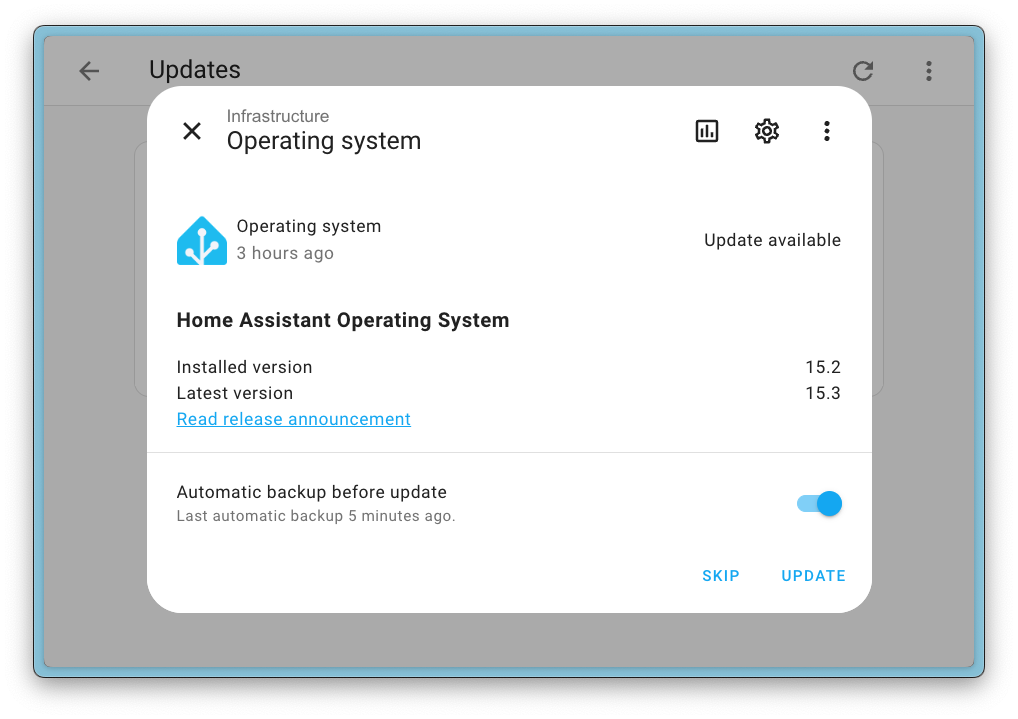
This way, you can be sure that you have a backup of your system before
upgrading, even if something goes wrong beyond the safeguards of the
operating system upgrade.
Set the default backup preference for upgrades
The above option to backup before upgrade is great, but the feedback on the
toggle to create a backup before upgrade is mixed. Some of you prefer to always
backup before upgrading, while others rely on their scheduled backups and don’t
want to be bothered with the backup process whenever they upgrade a part
of Home Assistant.
To please both groups, we have added a new setting to the backup settings page
to set the default behavior for the backup before upgrade toggle.

When you set the option to “Backup before upgrade”, the toggle will be enabled
by default, otherwise it will default to disabled. There is an additional
option to set this behavior for add-ons as well, so you can tweak it to your
liking.
Waiting for the backup to finish on restarts
Another small but important improvement is that if you initiate a restart of Home Assistant while a backup is in progress, your system will wait for the backup to finish before restarting.

This prevents the unintended situation where a backup is in progress, and you
abort the process by restarting Home Assistant.
Lots of new text-to-speech voice variants for Home Assistant Cloud subscribers
If you are subscribed to Home Assistant Cloud
not only get backup storage included
but you also get access to the most speedy, super accurate text-to-speech
available. If you haven’t tried it yet, now is the perfect time to sign up for the 30-day trial!
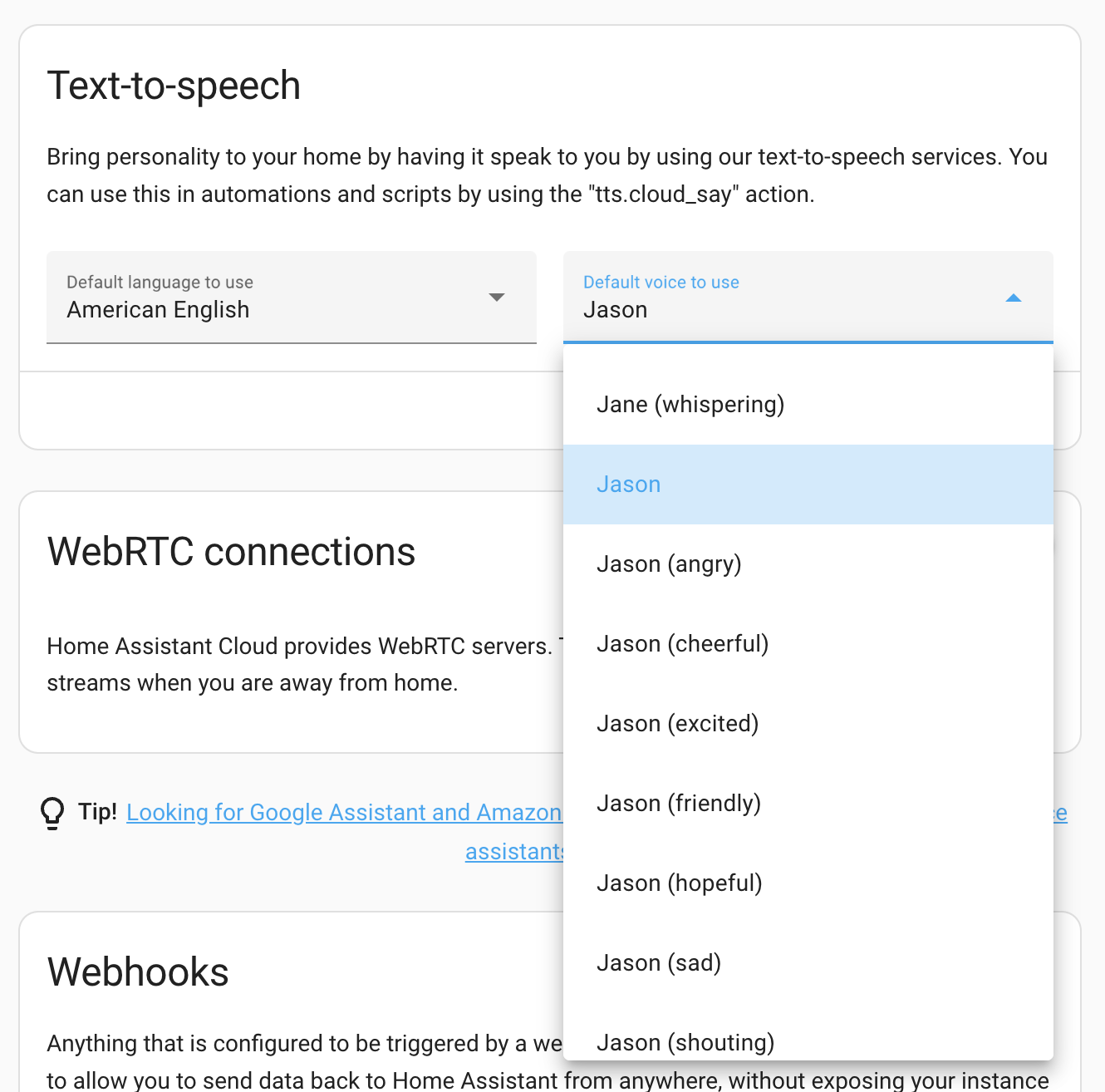
This release extends the already staggering number of text-to-speech voices,
but also now includes voice variants and styles. This means that you can
now choose between different voice styles and tones, such as “friendly”,
“angry”, “sad”, “whisper”, etc., allowing you to customize your announcements to
fit the mood and context of the situation.
Overview of new voice options
We’ve expanded our voice selection dramatically, with some languages seeing huge increases in available options:
| Language | Old choices | New choices |
|---|---|---|
| Assamese (India) new | 0 | 2 |
| German (Germany) | 15 | 17 |
| English (United Kingdom) | 14 | 20 |
| English (India) | 2 | 13 |
| English (United States) | 25 | 132 |
| Spanish (Spain) | 15 | 18 |
| Spanish (Mexico) | 15 | 23 |
| French (Canada) | 3 | 4 |
| French (France) | 14 | 22 |
| Hindi (India) | 2 | 12 |
| Italian (Italy) | 15 | 24 |
| Inuktitut (Canadian Aboriginal Syllabics, Canada) new | 0 | 2 |
| Inuktitut (Latin, Canada) new | 0 | 2 |
| Japanese (Japan) | 7 | 10 |
| Korean (Korea) | 8 | 10 |
| Oriya (India) new | 0 | 2 |
| Punjabi (India) new | 0 | 2 |
| Portuguese (Brazil) | 15 | 17 |
| Serbian (Latin, Serbia) new | 0 | 2 |
| Chinese (China) | 21 | 142 |
Picking entities
We are working on improving the context of things shown in the UI. This is to
ensure you always know which device or entity you are looking at, no matter
where you are in the Home Assistant interface.
In the last release, we already had a small noteworthy change regarding this.
We added the device and area to the entity information dialogs, so you always
know exactly which entity you are viewing.
In this release, we have improved the context provided within the entity pickers in our UI. This is the dropdown you see when you select an entity in, for example, a card, automation,
or script. This picker will now show the device and area name as well!
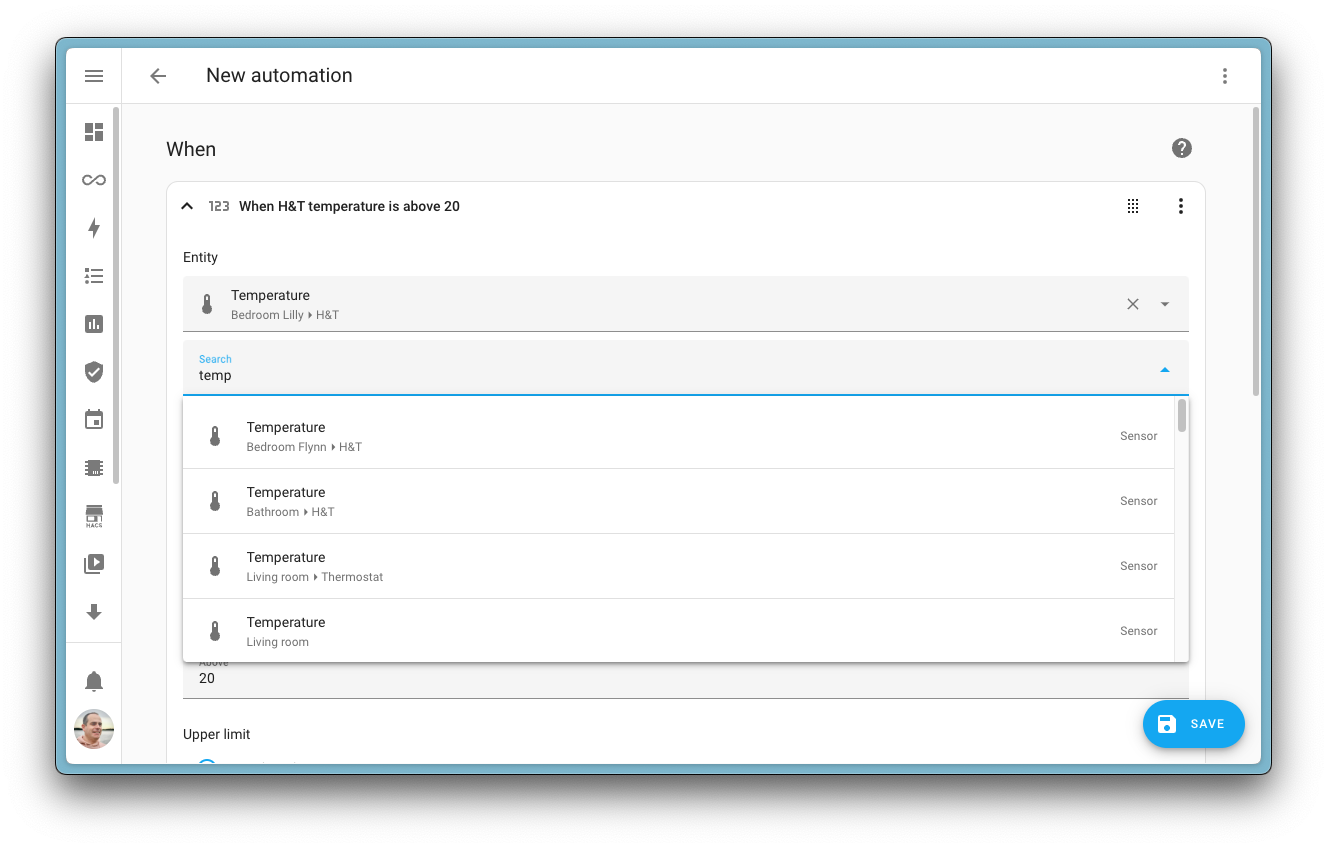
This enhancement gradually eliminates the need for you to manually rename
entities or devices to include location information—giving you a much better
out-of-the-box experience with less setup work.
Not only has the visual appearance of the picker improved, but the search
functionality has been completely overhauled too! 🔎 Finding the exact entity
you’re looking for is now significantly easier thanks to a smarter search
algorithm and the addition of more contextual information in the matching
process.
You might notice that the entity ID isn’t shown in the picker anymore!
We think we are at a point where you may solely rely on the UI and the
entity ID is not needed anymore. However, if you do prefer to see the
entity ID in this drop down, you can enable it in your profile settings.
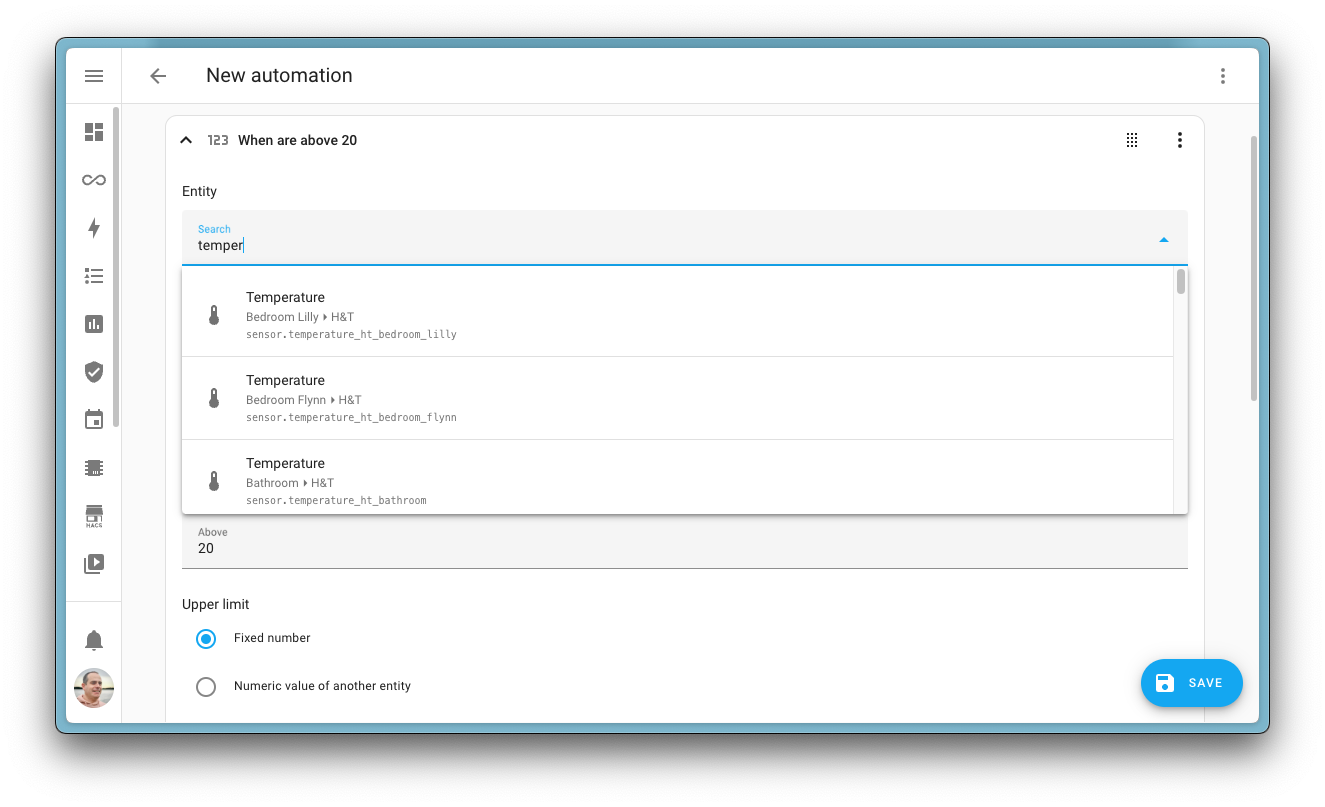
To do so, select your profile picture in the bottom left corner of the
Home Assistant UI, and under User settings enable
the Display entity IDs in picker option.

Z-Wave Long Range support and improved Smart Start
We are providing quite a few enhancements to the Z-Wave integration and
experience in this release. Our commercial partner Nabu Casa
is working on a not-so-secret Z-Wave antenna, and we want to ensure that
Home Assistant is ready for it by providing the best user experience
possible.
This release, we improved the whole experience in setting up new Z-Wave devices,
including improved support for setting up new Z-Wave devices by scanning the
Smart Start QR code.
Z-Wave Smart Start QR scanning now works natively in our mobile companion apps,
removing browser limitations. Added devices are immediately visible in
Home Assistant, even if the device is not yet powered on. Once powered on or rebooted, the
device will automatically be added to your Z-Wave network.
The most exciting part of this release is the addition of Z-Wave Long Range
support. This is a new Z-Wave technology that allows devices to communicate
over much longer distances than traditional Z-Wave devices. This is especially
useful if you have a specific device that needs to be placed far away,
for example, a contact sensor on a gate or mailbox up your driveway.

You can choose if you want to add the Z-Wave device to the existing mesh network
or connect it directly using Long Range.
After scanning the QR code of a Long Range capable device, you will get the
option to either add it to the existing mesh network or connect it directly
using Long Range. Both have pros and cons, mesh networking is recommended for
most devices, but if you have a device that needs to be placed far away,
Long Range might be the better option.
Integrations
Thanks to our community for keeping pace with the new integrationsIntegrations connect and integrate Home Assistant with your devices, services, and more. [Learn more]
and improvements to existing ones! You’re all awesome 🥰
New integrations
We welcome the following new integrations in this release:
-
AWS S3, added by @tomasbedrich
Use an Amazon S3 storagebucket as a backup location for your Home Assistant backups. -
Imeon Inverter, added by @Imeon-Energy
Integrates your Imeoninverter, allowing you to monitor your home battery
and solar usage in the energy dashboard. -
Miele, added by @astrandb
Monitor and control your Miele home appliances, including washing machines,
dryers, dishwashers, and more! -
ntfy, added by @tr4nt0r
Integrates with ntfy.sh, a simple HTTP-based pub-sub notification service
that allows you to send notifications to your phones or desktops. -
Rehlko, added by @PeteRager
Monitor the status of your Rehlko (formerly Kohler Energy Management) enabled
Kohler generator.
This release also has new virtual integrations. Virtual integrations
are stubs that are handled by other (existing) integrations to help with
findability. These ones are new:
-
Balay, provided by Home Connect, added by @Diegorro98
-
Constructa, provided by Home Connect, added by @Diegorro98
-
Gaggenau, provided by Home Connect, added by @Diegorro98
-
Google Gemini, provided by Google Generative AI, added by @tronikos
-
Maytag, provided by Whirlpool, added by @abmantis
-
National Grid US, provided by Opower, added by @tronikos
-
Neff, provided by Home Connect, added by @Diegorro98
-
Pitsos, provided by Home Connect, added by @Diegorro98
-
Profilo, provided by Home Connect, added by @Diegorro98
-
Siemens, provided by Home Connect, added by @Diegorro98
-
Thermador, provided by Home Connect, added by @Diegorro98
Noteworthy improvements to existing integrations
It is not just new integrationsIntegrations connect and integrate Home Assistant with your devices, services, and more. [Learn more] that have been added; existing
integrations are also being constantly improved. Here are some of the noteworthy
changes to existing integrations:
- The OpenAI Conversation integration now supports PDFs in the
openai_conversion.generate_contentaction,
meaning it can now, for example, summarize PDF reports for you.
Great work @Shulyaka! -
@allenporter
added a new LLM tool for fetching to-do list items,
enabling you to interact with the contents of your to-do lists via voice or chat
assistants. Awesome! - The HomeKit Bridge integration now has support for air purifiers!
Thanks @MaartenStaa! -
@frenck
extended the YouTube integration, allowing you to monitor your own
YouTube channel 📺. Nice! - The HEOS integration received multiple improvements from @andrewsayre
,
including the ability to add items to the play queue and remove queued items. - Thanks to @Danielhiversen
, the Mill integration now includes statistics,
making it possible to track your heating energy usage over time. Great! - The Xiaomi BLE integration now supports the Body Composition Scale S400,
thanks @zry98! -
SwitchBot now supports Roller Shade
and HubMini Matter devices.
Nice job @zerzhang! -
@lezmaka
worked on the Synology DSM integration, which now includes support
for external USB drives, allowing you to monitor external storage. Nice! - The La Marzocco integration has been extended with additional sensors and
statistic entities, providing better insights into your coffee machine’s performance.
Great additions @zweckj!
Integration quality scale achievements
One thing we are incredibly proud of in Home Assistant is our
integration quality scale. This scale helps us and our contributors to ensure
integrations are of high quality, maintainable, and provide the best possible
user experience.
This release, we celebrate several integrationsIntegrations connect and integrate Home Assistant with your devices, services, and more. [Learn more] that have improved
their quality scale:
-
4 integrations reached platinum 🏆
-
2 integrations reached silver 🥈
-
2 integrations reached bronze 🥉
This is a huge achievement for these integrations and their maintainers. The
effort and dedication required to reach these quality levels is significant,
as it involves extensive testing, documentation, error handling, and often
complete rewrites of parts of the integration.
A big thank you to all the contributors involved! 👏
Now available to set up from the UI
While most integrationsIntegrations connect and integrate Home Assistant with your devices, services, and more. [Learn more] can be set up directly from the Home Assistant
user interface, some were only available using YAML configuration. We keep moving
more integrations to the UI, making them more accessible for everyone
to set up and use.
The following integration is now available via the Home Assistant UI:
Farewell to the following
The following integrationsIntegrations connect and integrate Home Assistant with your devices, services, and more. [Learn more] are also no longer available as
of this release:
-
Oncue by Kohler has been removed because the app by Kohler has been
discontinued.
Other noteworthy changes
There are many more improvements in this release; here are some of the other
noteworthy changes this release:
- Did you know Home Assistant actually has keyboard shortcuts for all kinds of
things? No? Well… if you are curious to learn, after upgrading, press
?anywhere in the UI to see a list of all available keyboard shortcuts.
Nice addition @jpbede! - Support for the Matter 1.4 water heater device type has been added.
Thanks, @lboue! - When setting up a new device in Home Assistant, you can now directly name
it during the setup process. Nice! Thanks, @bramkragten! - Media players now have an action to search using the
media_player.search_media
action. Thanks, @zweckj! -
@piitaya
added a device_nametemplate function to get the name of a device
in Home Assistant. Cool! - The
floor_idandarea_idtemplate methods have been enhanced by @formatBCE
to also look for floors or area aliases. Awesome! - We now have support for trigger-based template entities for switches and
lights. Amazing work @Petro31! - Support for modern YAML-syntax was also added to the cover template entities
by @Petro31. Nice! -
@frenck
added support for detecting Home Assistant Container installation
types not running in host networking mode. This is important for
Home Assistant to function properly. It raises a repair issue if it detects
this. - A long-standing issue with iOS and the dropdown items in our user interface
has been fixed! No longer will it select the wrong item when you tap on it
while the dropdown is open and the keyboard is shown.
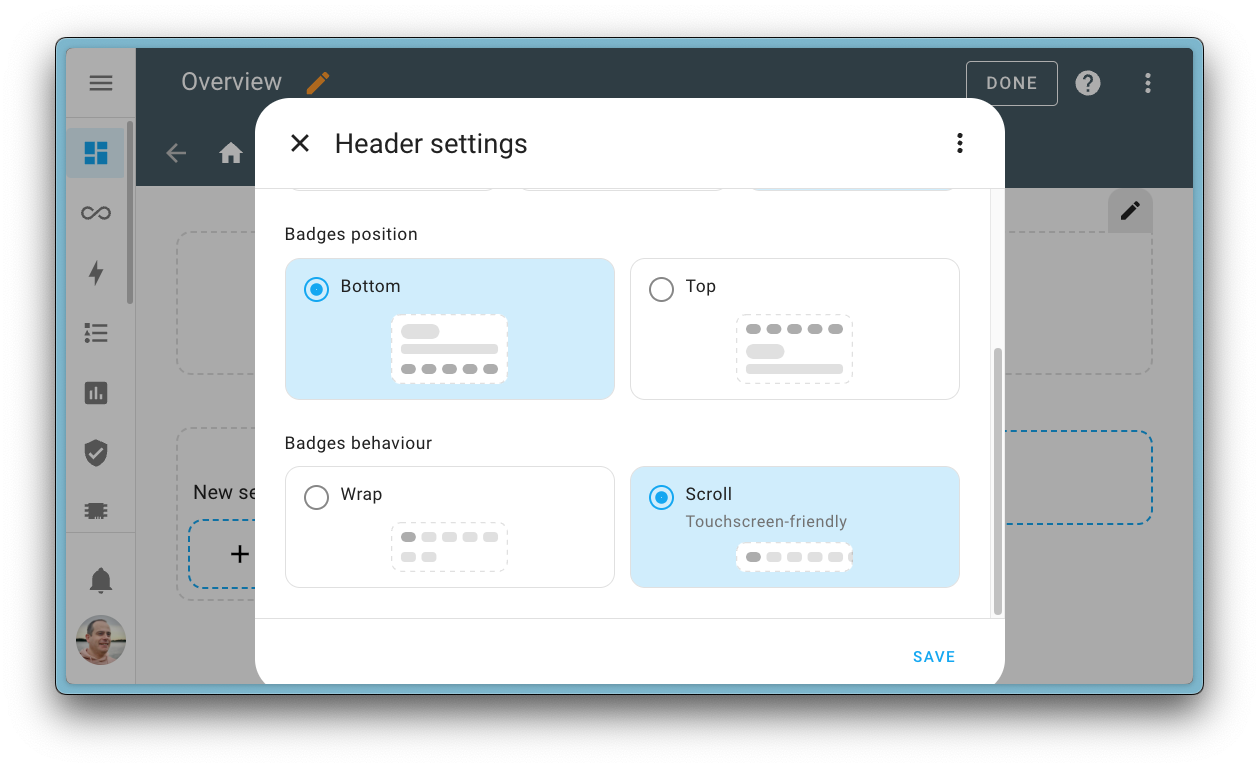
Badges on the dashboard can now be wrapped or scrolled
A cool little new feature for dashboards landed this release, which we don’t
want to rush past unnoticed. The behavior of the badges in the header of a
dashboard view can now be configured to either wrap or scroll.
Wrap was the original and is still the default behavior, but if you have a lot
of badges and primarily use a mobile device, scrolling might be a better option
for you.
Improved UI experience when using templates in automations & scripts
If you are a power-user, using templates in your automations and script, you
are probably familiar with the fact that the UI falls back to using YAML for
any action block that contains a template.
@karwosts
experience.
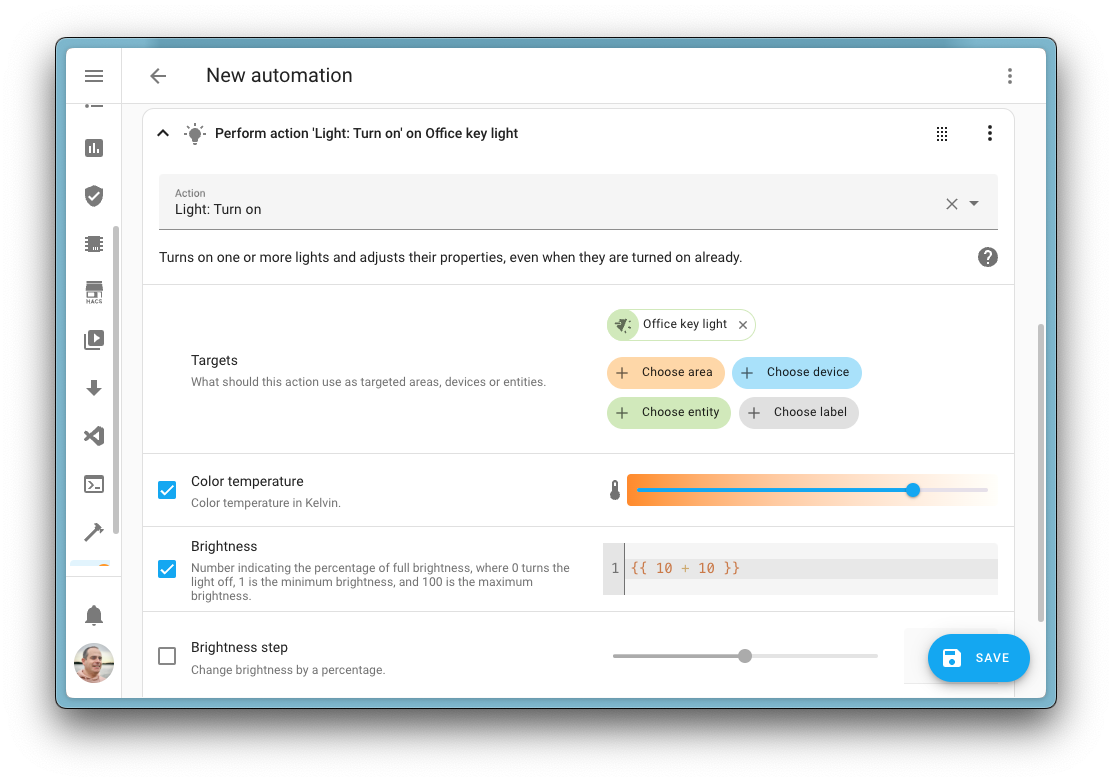
So, instead of falling back to pure YAML for the whole block, it now only
falls back to a code editor for fields containing an action template. This
means the rest of the UI—for all other action fields—remains intact and you
can still use the UI to edit the rest.
As you can see in this screenshot below, the brightness is set using a template,
which is no problem, as the rest of the action is still editable in the UI.
This is a great improvement for power users, as it allows you to use the UI
for most of the automation or script, while still being able to use templates
where needed. It also makes it easier to understand the automation or script,
as you can see the context of the template in the UI.
Great improvement there @karwosts
Pasting automations and scripts YAML directly into the UI
Found this great automation or script example in our documentation or the
community forums, but it is shared in
YAML format? No problem! You can now paste the YAML directly into the UI.
When you are editing an automation, you can now simply paste the YAML directly
into the UI editor and it will be converted to the UI format. This is regardless of
whether the pasted example is a full-blown automation or just a single trigger,
condition, or action.
An amazing quality of life improvement, contributed by @jpbede
Discover what Home Assistant is discovering
Home Assistant is constantly scanning your network for new devices and
integrations using all sorts of discovery protocols. This greatly improves your
experience, as it allows you to easily add new devices to your Home
Assistant installation.
However, sometimes, you might want to know what Home Assistant is seeing
or wonder why a certain device is not being discovered. To help with that
@bdraco
allow you to see what Home Assistant is seeing. It is quite technical, but
it is a great way to see what is going on in your network.
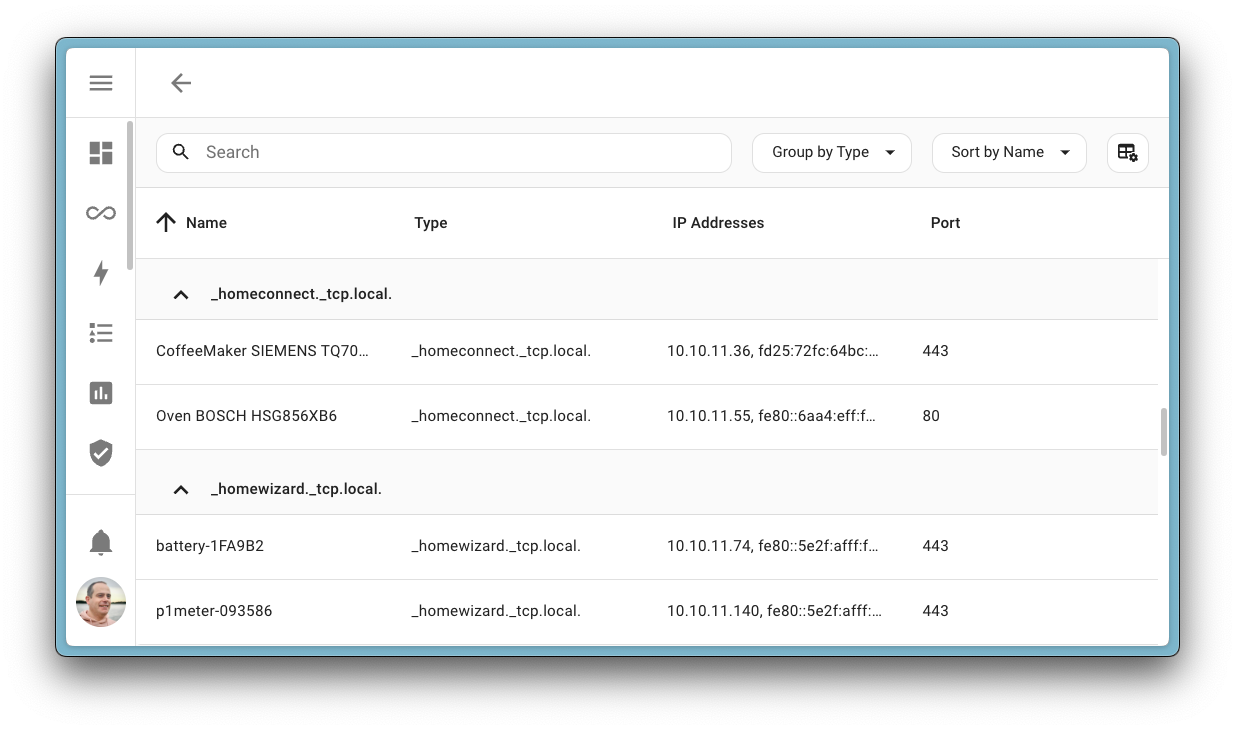
You can find these new tools in Settings > System > Network. At the
bottom of that page, you will find the ability to browse all the things
Home Assistant is seeing on your network for each of the discovery protocols.
Patch releases
We will also release patch releases for Home Assistant 2025.5 in May.
These patch releases only contain bug fixes. Our goal is to release a patch
release every Friday.
2025.5.1 – May 9
2025.5.2 – May 16
2025.5.3 – May 23
Need help? Join the community!
Home Assistant has a great community of users who are all more than willing
to help each other out. So, join us!
Our very active Discord chat server is an excellent place to be
at, and don’t forget to join our amazing forums.
Found a bug or issue? Please report it in our issue tracker
to get it fixed! Or, check our help page for guidance on more
places you can go.
Are you more into email? Sign-up for our Building the Open Home Newsletter
to get the latest news about features, things happening in our community and
other news about building an Open Home; straight into your inbox.
Backward-incompatible changes
We do our best to avoid making changes to existing functionality that might
unexpectedly impact your Home Assistant installation. Unfortunately, sometimes,
it is inevitable.
We always make sure to document these changes to make the transition as easy as
possible for you. This release has the following backward-incompatible changes:
Theming & Typography
In this release, we’ve made foundational updates to our theming system, which
include backwards incompatible changes:
-
Polymer Components Removed: Legacy Polymer-based components have been
fully removed. As a result, all relatedpaper-*CSS variables have also
been removed.- Some variables have been migrated to new theme tokens.
- Others were outdated and have been removed entirely.
-
New Typography Variables: We’ve introduced a new set of
typography CSS variables to lay the groundwork for a more consistent
and modern UI.- These are part of an ongoing refactor and are not yet in use everywhere.
More adoption will follow in future releases.
- These are part of an ongoing refactor and are not yet in use everywhere.
If you’re maintaining custom cards or themes, please update any usage of the
following variables accordingly.
✅ New tokens
--ha-font-family-body
--ha-font-family-heading
--ha-font-family-code
--ha-font-family-longform
--ha-font-size-scale
--ha-font-size-2xs
--ha-font-size-xs
--ha-font-size-s
--ha-font-size-m
--ha-font-size-l
--ha-font-size-xl
--ha-font-size-2xl
--ha-font-size-3xl
--ha-font-size-4xl
--ha-font-weight-light
--ha-font-weight-normal
--ha-font-weight-medium
--ha-font-weight-bold
--ha-font-weight-body
--ha-font-weight-heading
--ha-font-weight-action
--ha-line-height-condensed
--ha-line-height-normal
--ha-line-height-expanded
--ha-font-smoothing
❌ Removed tokens
--paper-font-common-nowrap_-_text-overflow
--paper-font-display1_-_letter-spacing
--paper-font-headline_-_letter-spacing
--paper-font-common-base_-_font-family
--paper-font-common-base_-_-webkit-font-smoothing
--paper-font-common-code_-_font-family
--paper-font-common-code_-_-webkit-font-smoothing
--paper-font-common-nowrap_-_white-space
--paper-font-common-nowrap_-_overflow
--paper-font-title_-_overflow
--paper-font-title_-_text-overflow
--paper-font-title_-_text-overflow
--paper-font-title_-_white-space
--paper-item-body-two-line-min-height
--paper-time-input-justify-content
--paper-item-body-three-line-min-height
--paper-item-icon-width
--paper-card-header-color
--paper-dialog-color
--paper-font-headline_-_white-space
--paper-font-headline_-_overflow
--paper-font-headline_-_text-overflow
--paper-font-subhead_-_white-space
--paper-font-subhead_-_overflow
--paper-font-subhead_-_text-overflow
--paper-item-icon-active-color
--paper-listbox-background-color
🔄 Migrated tokens
--code-font-family → --ha-font-family-code
--paper-font-title_-_-webkit-font-smoothing → --ha-font-smoothing
--paper-font-headline_-_-webkit-font-smoothing → --ha-font-smoothing
--paper-font-display1_-_-webkit-font-smoothing → --ha-font-smoothing
--paper-font-subhead_-_-webkit-font-smoothing → --ha-font-smoothing
--paper-font-body1_-_-webkit-font-smoothing → --ha-font-smoothing
--paper-font-display1_-_font-family → --ha-font-family-body
--paper-font-display1_-_font-size → --ha-font-size-4xl
--paper-font-display1_-_font-weight → --ha-font-weight-normal
--paper-font-display1_-_line-height → --ha-line-height-condensed
--paper-font-headline_-_font-family → --ha-font-family-body
--paper-font-headline_-_font-size → --ha-font-size-2xl
--paper-font-headline_-_font-weight → --ha-font-weight-normal
--paper-font-headline_-_line-height → --ha-line-height-condensed
--paper-font-title_-_font-family → --ha-font-family-body
--paper-font-title_-_font-size → --ha-font-size-xl
--paper-font-title_-_font-weight → --ha-font-weight-medium
--paper-font-title_-_line-height → --ha-line-height-normal
--paper-font-subhead_-_font-family → --ha-font-family-body
--paper-font-subhead_-_font-size → --ha-font-size-l
--paper-font-subhead_-_font-weight → --ha-font-weight-normal
--paper-font-subhead_-_line-height → --ha-line-height-normal
--paper-font-body1_-_font-family → --ha-font-family-body
--paper-font-body1_-_font-size → --ha-font-size-m
--paper-font-body1_-_font-weight → --ha-font-weight-normal
--paper-font-body1_-_line-height → --ha-line-height-normal
--paper-item-icon-color → --state-icon-color
17TRACK
The previously deprecated state attributes for the 17TRACK entities
have been removed.
If you relied on these attributes in your automations or scripts, you will need
to update them to use the dedicated sensors instead.
(@joostlek
AVM FRITZ!SmartHome
The AVM Fritz!Smarthome has a concept of devices and units. A device can have
multiple units with different features. We now merge all units of a device into
one entry representing the physical device.
As this might remove existing devices and create new ones, you should check your
automations and scripts to see if they need to be adjusted to the new device registry
entries.
(@mib1185
All the extra state attributes of the climate entity got migrated to their
own entities. With this these attributes are deprecated and will be removed
in Home Assistant 2025.11.
If you rely on these attributes in your automations or scripts, you will need
to update them to use the dedicated sensors instead.
(@mib1185
Generic Thermostat
The switch targeted by the Generic Thermostat is now only turned on when the
current temperature falls outside the target temperature range
(target_temp +- tolerances).
Previously, it would also turn on when the temperature was equal to the limit
of the target range.
(@esand
HomeKit Bridge
The name configured in Home Assistant now takes precedence for the following
HomeKit child accessories:
- Fan presets (switches)
- Media player sources (switches)
- Power strips (Input Select, etc) (outlets)
- Triggers (stateless programmable switches)
This fixes an issue where the name is missing in HomeKit for these child
accessories. The downside is that the name provided by Home Assistant
has to be changed in Home Assistant (where applicable).
(@bdraco
Google Maps Travel Time
Google has deprecated the Distance Matrix API. The new Routes API does not
provide the state attributes Destination addresses and Origin addresses
anymore.
The amount of free requests got halved, resulting in the sensor now refreshing
every 10 minutes instead of every 5 minutes.
(@eifinger
La Marzocco
La Marzocco released the gateway firmware v5 last month, which stopped
supporting local communication. We now fully support this firmware; support for
older firmware has been dropped.
The following entities and controls are missing, either because they are no
longer supported by the app or not part of the new library version yet:
- Steam & coffee boiler temperatures
- Shot timer sensor
- Scale support
- Steam temperature number
- Prebrew & Preinfusion numbers
(@zweckj
Network UPS Tools (NUT)
The status sensor has changed, providing the state from the UPS Display.
Previously, multiple states would be concatenated using a space, which made
them harder to read and process. As of this release, multiple statuses are
separated using a comma instead.
(@bonanitech
The scan interval option has been removed from NUT. Scans default to once
every 60 seconds. If needed, an integration-independent and
common method
can be used to set a custom polling interval.
(@tdfountain
Opower
If you return energy to the grid, you will have to reconfigure your energy
dashboard.
For improved experience in the energy dashboard, negative energy
consumption/cost values have been separated into two dedicated
return/compensation statistics.
Add Opower {utility name} elec {account number} return under
Return to grid to see return energy statistics. Track return compensation
using Opower {utility name} elec {account number} compensation.
(@parkerbxyz
Overkiz
Previously, for Atlantic Electrical Towel Dryer devices, the ‘auto’ HVAC mode
in Home Assistant was mapped to the ‘prog’ mode in Overkiz.
Now, the ‘auto’ mode in Home Assistant will correspond directly to the
‘auto’ mode in Overkiz, while the ‘prog’ mode can be selected using presets.
(@iMicknl
Persistent notifications
Persistent notifications are no longer created when devices are discovered.
Automations that trigger on the persistent notification
config_entry_discovery should be updated to instead trigger on the
event config_entry_discovered.
(@emontnemery
Total Connect
The previously deprecated state attributes for the Total Connect alarm control
panel have been removed.
If you relied on these attributes in your automations or scripts, you will need
to update them to use the dedicated sensors instead.
(@joostlek
If you are a custom integration developer and want to learn about changes and
new features available for your integration: Be sure to follow our
developer blog. The following changes are the most notable for this release:
All changes
Of course there is a lot more in this release. You can find a list of
all changes made here: Full changelog for Home Assistant Core 2025.5


