
 Kvs satish
When you look at your PlayStation 5, it’s easy to think the USB ports are only there to charge controllers. That’s the obvious use, and it’s the one most of us rely on every day. But the truth is, those ports can do a lot more than people realize.
Once you understand what they’re capable of, the USB slots on your console stop being background details and start feeling like secret passageways into a more flexible and personal gaming setup.
And here’s the thing: some of these features can change the way you play, back up, and even share your gaming life. Curious about what you might be missing? Let’s dive in.
PS5 USB ports are scarce, but they can do more than you know
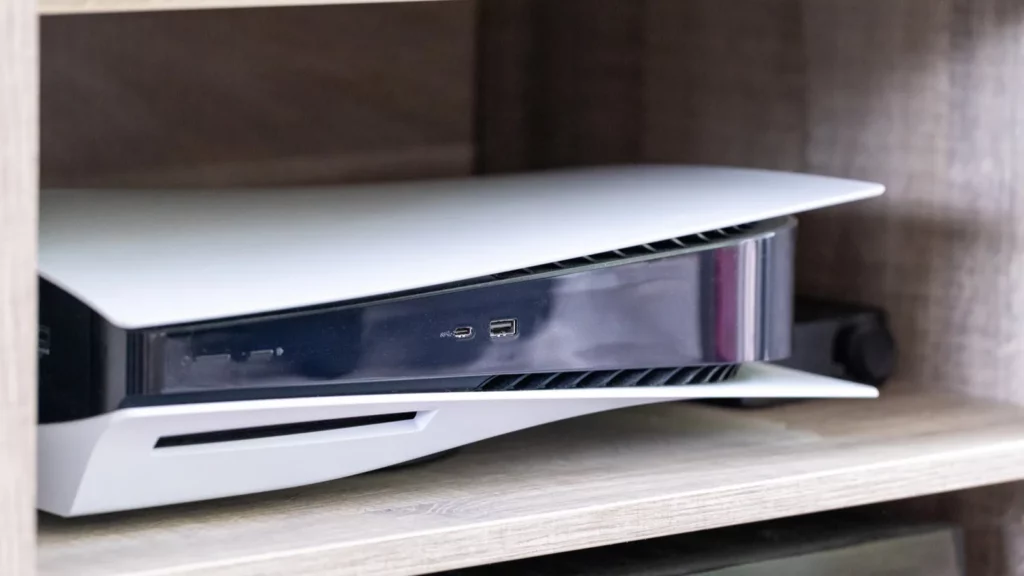
Sony equipped the PS5 with four USB ports (two USB-A ports on the back, one USB-A and one USB-C port on the front). That sounds fine until you start plugging in peripherals. Between controllers, headsets, VR gear, and external drives, you’ll find yourself juggling what gets priority.
For many players, that limitation hides just how much those USB ports can actually do. They aren’t just charging points. They’re tools that unlock new ways to save, share, and connect.
So the challenge isn’t just about scarcity. It’s about knowing how to get the most out of what you already have.
You can back up your saves without relying on the cloud
PlayStation Plus subscribers get automatic cloud saves, but there’s a catch: only the person with the subscription is covered. Everyone else on the console is left out.
That’s where a USB stick comes in. Format it to exFAT or FAT32, plug it in, and head to Settings > System > System Software > Back Up and Restore > Back Up Your PS5. From there, you can pick and choose what to save.
This matters more than you might think. A USB backup means you can move your data between consoles or restore your progress if something goes wrong. It’s a safety net for every profile, not just the one paying for Plus.
Here is a social media post that uncovers surprising PS5 USB port hidden features gamers overlook:
The PS5 console has four USB ports with different connection speeds.
The ports can be used for various peripheral devices such as wireless controllers and PlayStation VR2.
PS5 USB ports guidehttps://t.co/raStH2xmQ5 pic.twitter.com/v4bcZspPTw
— Ask PlayStation (@AskPlayStation) July 1, 2025
You can copy videos and screenshots directly
Capturing your gameplay is half the fun these days. While many players pull clips through the PlayStation app, that process involves uploads, compression, and sometimes waiting on cloud sync.
The faster way is a USB drive. Go into your Media Gallery, select what you want, and hit Copy to USB Drive. No compression. No uploads. Just raw files straight from your PS5 to a portable stick.
This trick is a lifesaver if you edit videos on a computer or just want to keep a clean archive of your favorite highlights.
You can expand your storage without opening the console
The PS5’s lightning-fast SSD fills up quickly, especially with modern game sizes. Sony lets you expand with an internal M.2 NVMe drive, but that means unscrewing panels and installing hardware.
The easier route? Use an external USB drive. Here’s how it breaks down:
- PlayStation 4 games can run directly from a USB hard drive or SSD.
- PlayStation 5 games can’t run from USB, but you can “cold store” them there. That means moving them off the main SSD to free up space, then moving them back when you want to play.
It’s not as slick as expanding the internal drive, but it’s faster than redownloading 100 GB every time. A decent SATA SSD via USB is perfect for this role.
You can connect peripherals that make games more immersive
The USB ports also unlock experiences beyond the controller. Racing fans can plug in wheels like the Logitech G29. VR players can hook up PS VR or PS VR2 gear. Streamers can connect the official PS5 HD Camera.
Each of these turns the console into something more personal. The catch is that the PS5 doesn’t recognize every USB device under the sun. For cameras, for example, you need Sony’s official gear.
Still, when supported, the USB ports become your gateway to niche but powerful experiences.
USB audio is easier than most people realize
One of the PS5’s underappreciated strengths is how easily it handles USB audio. Many wired headsets and microphones plug straight in and just work. That goes for official Sony gear and for a lot of third-party options that appear to the system as generic USB audio.
It won’t work through the controller’s port, that one is 3.5mm only, but directly into the console; USB audio is often plug and play. For players sitting close to the console or using a desk monitor setup, this is one of the simplest ways to get better sound.
You can pair controllers instantly

Charging your DualSense with a USB cable feels obvious, but that cable also does something else. It pairs the controller to the console instantly.
This is handy if you move controllers between multiple PS5s or use them with a PC. Instead of fiddling with wireless settings, just plug the cable into a front USB port, wait a second, and it’s connected.
It’s a small feature, but once you use it, you never go back.
You can manage media playback from a USB
Not every PS5 owner realizes the console doubles as a media player. Load up a USB drive with videos, music, or photos, plug it in, and head to the Media Gallery. From there, you can play files without copying them to the internal drive.
It turns the PS5 into a part-time entertainment hub. Whether you’re watching old family clips or playing music through your surround setup, the USB port is the bridge.
Wonder how tech geeks are making the most out of this information? Here is a YouTube video that shares quick PS5 USB port secrets most players miss:
You can keep entire backups of the system
Beyond saves and media, the PS5 lets you back up the whole console to a USB drive. That includes apps, games, and system data. If you ever reset your PS5 or move to another one, restoring from that backup saves hours of reinstalling.
The only real requirement is a large enough external drive. A 1 TB external SSD is more than enough for most players.
You can work around the lack of ports with a hub
Here’s the downside. Because the PS5 only has three usable USB slots, you’ll run out fast. Add a headset dongle, a drive, and a controller cable, and suddenly you’re out of options.
That’s where a powered USB hub can help. While you can’t use hubs for external storage drives, you can use them for peripherals. A good USB 3.2 hub gives you the space to connect wheels, keyboards, headsets, or charging cables without unplugging something else every time.
It’s not glamorous, but it solves a problem that almost every PS5 owner bumps into sooner or later.
What does this all add up to?
The PS5’s USB ports look simple, but they’re quietly some of the most useful parts of the console. They handle everything from basic controller pairing to full system backups. They let you carry saves between households, archive entire gaming sessions, and even turn your console into a media player.
The catch is that none of this is obvious. Sony doesn’t advertise it. And unless you dig into the settings, you might never know how much power those little ports actually hold.
So the question is this. Are you just charging your controllers, or are you ready to unlock everything hiding in plain sight?
Recommended Posts:
This article was made with AI assistance and human editing.


